Observability part 2: AI assistance
Builds on Part 1 by creating an AI agent that reviews workflow logs and summarizes failures automatically. Defines tools for querying Loki, retrieving workflow metadata, and feeding the results into an agent with clear troubleshooting instructions. Shows example runs where the agent highlights root causes and suggests next steps after a Nextflow job error. Reflects on how automation can accelerate incident response and where the approach could evolve next.

Introduction
In Part 1, I walked through an approach for improving the observability of a Slurm high-performance computing cluster running Nextflow workflows. By adding centralized and metadata-enriched logging, we gained the ability to easily query and filter our workflow logs using Loki without needing to be logged in to the cluster itself. While this alone is quite a useful capability to have during troubleshooting, it still requires us to manually review the workflow logs in the event of a failure. In this post, I’m going to show how we can instead delegate the initial troubleshooting task to an AI agent. By reviewing the logs and other relevant information immediately following a workflow failure, the agent can quickly provide a general summary of the issue and, in some situations, offer guidance on how to resolve it.
Workflow troubleshooting agent
If you recall from some of my previous AI-related posts, I consider agents as being defined by four components:
- Instructions or “prompts”: This is where the agent’s task must be clearly defined. A description of what input will be provided to the agent, the tools it has access to for obtaining additional information, and the desired output should all be specified in the instructions.
- Tools: These are software programs that the agent can use to obtain additional information. It can be a generic tool, like the ability to perform a web search, or a custom tool written specifically for the agent to use.
- Input: This is the information provided to the agent.
- Output: The desired output of the agent, whether a plain text response, formatted text like Markdown, or structured output.
Since the agent’s instructions will be highly dependent on the tools we provide, let’s start with the tools first.
Agent tools
Since we want the agent to be able to review the logs for a Nextflow workflow, we need to write a tool that can query logs from Loki and return them to the agent for review. I had ChatGPT Codex quickly write a utility function for querying Loki with a straightforward interface:
1
2
3
4
5
6
7
8
9
10
11
12
from loki_utils import LokiClient

client = LokiClient(base_url="http://loki:3100")

query = '{source="nextflow"} | json | nextflow_run="exome_TESTSAMPLE02"'

records = client.query_range(
    query=query,
    hours_ago=2,
    limit=1,
    direction="FORWARD",
)
This returns a list of dictionaries, where each dictionary is a single Loki log entry:
1
2
3
4
5
6
7
8
9
10
11
12
13
14
15
16
17
18
19
20
21
22
[
    {
        "timestamp": "1764349761517098903",
        "labels": {
            "attempt": "1",
            "detected_level": "unknown",
            "file": "/nextflow/work/72/04bf10497b419c3fac3bc56701a2fe/.command.out",
            "log": "Starting alignment for sample: TESTSAMPLE02",
            "nextflow_run": "exome_TESTSAMPLE02",
            "process": "ALIGN",
            "sample": "TESTSAMPLE02",
            "service_name": "unknown_service",
            "slurm_job_id": "71",
            "slurm_node": "c1",
            "source": "nextflow",
            "stream": "stdout",
            "user": "slurmuser",
            "workflow": "exome-fluent.nf"
        },
        "record": "{\"log\":\"Starting alignment for sample: TESTSAMPLE02\",\"attempt\":\"1\",\"user\":\"slurmuser\",\"slurm_job_id\":\"71\",\"slurm_node\":\"c1\",\"workflow\":\"exome-fluent.nf\",\"nextflow_run\":\"exome_TESTSAMPLE02\",\"file\":\"/nextflow/work/72/04bf10497b419c3fac3bc56701a2fe/.command.out\",\"process\":\"ALIGN\",\"sample\":\"TESTSAMPLE02\"}"
    }
]
You might notice that the labels section has a lot more labels than we originally specified using our Fluent Bit configuration in the previous post. These extra ones are not actually Loki labels, but were dynamically included when we added the json parser to our query. Regardless, our original log entry is in JSON format in the record field.
We will wrap this Loki query utility in a @function_tool to allow our AI agent to query for all log entries associated with a named Nextflow run. We will have the function return a JSON string containing the log entries:
1
2
3
4
5
6
7
8
9
10
11
12
13
14
15
16
17
18
19
20
21
22
23
24
25
26
27
28
29
30
31
32
33
34
35
36
import json
from agents import function_tool
from loki_utils import LokiClient
import pandas as pd

@function_tool
async def retrieve_logs_for_run(run_name: str, lookback_hours: int = 72) -> str:
    """Query Loki for logs associated with a given Nextflow run name."""
    print(f"retrieve_logs_for_run({run_name}, {lookback_hours})")
    client = LokiClient(base_url="http://loki:3100")
    query = f'{{source="nextflow"}} | json | nextflow_run="{run_name}"'
    raw_records = client.query_range(
        query=query,
        hours_ago=lookback_hours,
        limit=5000,
        direction="FORWARD",
    )

    records = []
    for record in raw_records:
        entry = json.loads(str(record["record"]))
        records.append(
            {
                "timestamp": pd.to_datetime(int(record["timestamp"]), unit="ns"),
                "stream": record["labels"]["stream"],
                **entry,
            }
        )

    records_df = pd.DataFrame(records)
    # arrange by timestamp ascending
    records_df = records_df.sort_values(by="timestamp", ascending=True).reset_index(
        drop=True
    )
    print(f"  - Retrieved {len(records_df)} log records for run {run_name}")
    return json.dumps(records_df.to_dict(orient="records"), default=str)
In addition to providing the agent with the logs, it will be beneficial to also provide it with the Nextflow workflow itself so the agent has additional context to associate with the log messages. To do that, we can define another function to return the contents of a workflow by name:
1
2
3
4
5
6
7
8
9
10
11
12
13
14
15
16
17
18
19
from pathlib import Path
from agents import function_tool

WORKFLOW_BASE_PATH = Path("/nextflow/workflows")

WORKFLOW_CONTENTS = {
    "exome-fluent": (WORKFLOW_BASE_PATH / "exome-fluent.nf").read_text()
}

@function_tool
async def retrieve_workflow_definition(workflow_file: str) -> str:
    """Retrieve the Nextflow workflow definition for a given workflow name."""
    print(f"retrieve_workflow_definition({workflow_file})")
    # remove .nf extension if present
    if workflow_file.endswith(".nf"):
        workflow_file = workflow_file[:-3]
    if workflow_file in workflow_definitions:
        return workflow_definitions[workflow_file]
    return f"Workflow definition for {workflow_file} not found."
With these two tools, the agent can request the logs for a specific workflow run as well as the workflow definition. Now we just need to provide the appropriate instructions to the agent.
Agent instructions
Let’s provide a basic prompt explaining the agent’s task:
You are an observability agent tasked with querying logs from Nextflow runs to investigate failures. You have access to a tool that retrieves logs for a given Nextflow run name. When a user provides a Nextflow run name to investigate, use the tool to retrieve logs for that run name. The logs are returned in a structured JSON format with various fields. Identify any errors in the logs, and provide insights or potential causes based on the logs. Always report the exact path of any log file with errors. You should also retrieve the Nextflow workflow definition using the retrieve_workflow_definition tool. Provide the tool with the exact file name of the workflow file from the
workflowfield (without the path). The Nextflow workflow definition will provide important context when troubleshooting errors seen in the logs.
Agent input and output
From the above instructions, the agent expects to get the name of a Nextflow run to investigate as input, and we haven’t specified any specific output format, so it will respond in text (often Markdown). Along with our tool definitions above, we can define the agent and have it accept a query via command line argument. You can view the full script in the repo, but here is the definition and execution using the CLI query argument as input:
1
2
3
4
5
6
7
8
9
10
11
12
13
14
15
16
17
18
19
args = parse_args()
log_agent = Agent(
    name="Workflow Observability Agent",
    model_settings=ModelSettings(tool_choice="required"),
    tools=[
        retrieve_logs_for_run,
        retrieve_workflow_definition,
    ],
    model="gpt-5.1",
    instructions=AGENT_INSTRUCTIONS,
)

with trace("Workflow Observability Agent"):
    response = await Runner.run(
        starting_agent=log_agent,
        input=args.query,
    )
print("Agent Response:")
print(response.final_output)
Next, let’s consider how to test our new agent.
Simulating a workflow failure
Since our exome-fluent workflow just simulates the components of an exome workflow, we’ll need to also simulate a workflow failure. We can do that randomly by defining a function like this in our workflow:
1
2
3
4
5
6
7
8
def randomError(message, chance_per_thousand) {
    """
    if (( RANDOM % 1000 < ${chance_per_thousand} )); then
        echo "${message}" > /dev/stderr
        exit 1
    fi
    """.stripIndent()
}
We can then update several workflow processes to call the function to create the possibility of failure. For example, we can modify the ALIGN script:
1
2
3
4
5
6
7
8
9
10
11
12
13
14
15
16
17
18
19
    script:
    """
    ${jsonHeader(task, sample_id)}
    echo "Starting alignment for sample: ${sample_id}"
    echo "R1: ${reads1}"
    echo "R2: ${reads2}"
    echo "Ref: ${ref_fa}"

    for step in \$(seq 0 100); do
        echo "Aligning... \${step}% complete"
        ${randomError('Out of memory', 1)}
        sleep 0.1
    done

    # Demo: just create a dummy BAM file
    echo "DUMMY_BAM_CONTENT" > ${sample_id}.aligned.bam
    ${complete(task)}
    """
}
After adding calls to randomError() to various parts of the workflow, I saved it as a new version called unreliable-exome.nf, and added it to the WORKFLOW_DEFINITIONS dictionary in agent.py. Next, I ran the workflow a few times on various samples to generate a failure:
1
2
3
4
5
6
7
8
9
10
11
12
13
14
15
16
17
cd /nextflow/runs
mkdir batch_001
cd batch_001
for i in $(seq 5 10); do
    SAMPLE_NAME="TESTSAMPLE${i}"
    touch "r1_${SAMPLE_NAME}.fastq.gz" "r2_${SAMPLE_NAME}.fastq.gz"
    sbatch --mem=256M --cpus-per-task 1 \
        nextflow run \
            -config /nextflow/workflows/nextflow.config \
            -profile slurm \
            -name exome_$SAMPLE_NAME \
            /nextflow/workflows/unreliable-exome.nf \
                --sample_id $SAMPLE_NAME \
                --reads1 r1_${SAMPLE_NAME}.fastq.gz \
                --reads2 r2_${SAMPLE_NAME}.fastq.gz \
                --ref_fa /nextflow/runs/common/genome.fa
done
With all the logs being sent to Loki, it was easy to watch for a failure using logcli:
1
2
3
4
5
6
logcli query \
    --quiet \
    --no-labels \
    '{ source="nextflow", stream="stderr" }
    | json
    | line_format "{{.workflow}} {{.sample}} {{.process}} {{.stream}}: {{.log}}"'
That returned a failure for one sample: unreliable-exome.nf TESTSAMPLE7 ALIGN stderr: Out of memory. Let’s give the agent a try.
Testing the agent
Since the agent will review the workflow logs as well as the Nextflow workflow definition itself, I strongly suspect it will quickly see through our little ruse and determine the root cause of the “Out of memory” error.
1
2
cd /nextflow/agent
python3 agent.py --query "Examine the error that occurred with run exome_TESTSAMPLE7."
Sure enough, it produced this extensive Markdown-formatted response:
1
2
3
4
5
6
7
8
9
10
11
12
13
14
15
16
17
18
19
20
21
22
23
24
25
26
27
28
29
30
31
32
33
34
35
36
37
38
39
40
41
42
43
44
45
46
47
48
49
50
51
52
53
54
55
56
57
58
59
60
61
62
63
64
65
Here’s what happened in run `exome_TESTSAMPLE7` based on the logs and workflow definition.

1. **Location of the error**

   The failure occurred in the `ALIGN` process.
   The exact log file containing the error is:

   - `/nextflow/work/34/7e6cd406ff5d00d733e03d400d96ab/.command.err`

   The relevant entry:

   - `stderr`: `Out of memory`

2. **What the process was doing**

   From `.command.out` (`/nextflow/work/34/7e6cd406ff5d00d733e03d400d96ab/.command.out`), we see:

   - Process: `ALIGN`
   - Sample: `TESTSAMPLE7`
   - Inputs:
     - `R1: r1_TESTSAMPLE7.fastq.gz`
     - `R2: r2_TESTSAMPLE7.fastq.gz`
     - `Ref: genome.fa`
   - Progress messages: `"Aligning... X% complete"` up to `82% complete` on stdout.
   - Immediately after 82%, stderr reports `Out of memory`, and the process fails.

3. **Why this error appears (from the workflow definition)**

   The workflow file `unreliable-exome.nf` defines `ALIGN` as:

   - It loops from 0 to 100%:
     ```bash
     for step in $(seq 0 100); do
         echo "Aligning... ${step}% complete"
         ${randomError('Out of memory', 1)}
         sleep 0.1
     done
     ```
   - `randomError('Out of memory', 1)` expands to:
     ```bash
     if (( RANDOM % 1000 < 1 )); then
         echo "Out of memory" > /dev/stderr
         exit 1
     fi
     ```
   - This means on each step there is a **1-in-1000 chance** the process will:
     - Print `Out of memory` to stderr, and
     - `exit 1` (hard failure).

   So in this particular run, the random error was triggered around 82% completion and caused the ALIGN process to exit with a simulated “Out of memory” error.

4. **Implications**

   - This is **intentional, stochastic failure behavior** baked into `unreliable-exome.nf` for demo/testing.
   - There is no evidence here of a real system OOM (e.g., no cgroup/memory limit messages, no Slurm `OUT_OF_MEMORY` text); the string is generated by the script itself.

5. **Next steps / how to avoid this in real runs**

   If you want to stop seeing this kind of random failure in `ALIGN`:

   - Edit `unreliable-exome.nf` and remove or change the `randomError('Out of memory', 1)` line inside the ALIGN loop, e.g.:
     - Comment it out, or
     - Set the chance to 0 (or a far lower probability) if you still want occasional test failures.

   If you suspect genuine memory issues in another context, you’ll want to also look at Slurm job state and node logs, but for this run the failure is clearly induced by the workflow’s `randomError` helper.
Clearly, the agent was able to:
- retrieve the relevant logs for the failed Nextflow run
- retrieve the Nextflow workflow definition
- analyze both and determine the synthetic nature of the failure message
This is very encouraging, as it suggests that in a real-world scenario the agent will be capable of analyzing the log output alongside the workflow definition in order to determine the cause of the failure. Engineering a test that is closer to a real-world genomics workflow failure is unfortunately a bit beyond the scope of this post!
What we can do, however, is think about how this agent might communicate its findings back to us. There is no reason we should have to manually run the agent after a workflow failure - we can easily detect errors from the nextflow exit code. So, let’s wire up our agent so it runs automatically on failure and reports back.
Agent integration
A convenient way for the agent to communicate would be a Slack channel. I’m not going to go over all the steps here, but it is relatively straightforward to create an app with an associated bot user in Slack and give it permissions to post messages. The bot can then post messages to any channel it is a member of. We’ll utilize this to have the agent send its Markdown-formatted response to a #workflow-errors channel in Slack. See the full Slack-enabled agent code. The relevant Slack portion is at the end:
1
2
3
4
5
6
7
8
9
10
11
12
13
14
15
16
17
18
from slack_sdk import WebClient

client = WebClient(token=os.getenv("SLACK_BOT_TOKEN"))
channel_name = "workflow-errors"
message_blocks = [
    {
        "type": "header",
        "text": {
            "type": "plain_text",
            "text": f"Run {args.run_name} Failure Analysis",
        },
    },
    {
        "type": "markdown",
        "text": response.final_output,
    },
]
client.chat_postMessage(channel=channel_name, blocks=message_blocks)
Now we just need to automatically run our new agent-slack.py after a workflow failure. For testing purposes, we can use a simple wrapper script:
1
2
3
4
5
6
7
8
9
10
11
12
13
14
15
16
17
18
19
20
21
22
23
24
25
26
27
#!/bin/bash

# Wrapper script to run a Nextflow workflow and, if it errors, invoke the
# agent-slack.py script to analyze the error and post to Slack.

SAMPLE_NAME=$1

touch "r1_${SAMPLE_NAME}.fastq.gz"
touch "r2_${SAMPLE_NAME}.fastq.gz"

nextflow run \
    -config /nextflow/workflows/nextflow.config \
    -profile slurm \
    -name exome_$SAMPLE_NAME \
    /nextflow/workflows/unreliable-exome.nf \
        --sample_id $SAMPLE_NAME \
        --reads1 r1_${SAMPLE_NAME}.fastq.gz \
        --reads2 r2_${SAMPLE_NAME}.fastq.gz \
        --ref_fa /nextflow/runs/common/genome.fa
EXIT_CODE=$?
if [ $EXIT_CODE -ne 0 ]; then
    echo "Workflow failed with exit code $EXIT_CODE. Invoking agent-slack.py..."
    source /nextflow/agent/.venv/bin/activate
    python /nextflow/agent/agent-slack.py --run-name exome_$SAMPLE_NAME
else
    echo "Workflow completed successfully."
fi
I ran another batch of samples using the wrapper script:
1
for i in $(seq 70 75); do sbatch --mem=256M /nextflow/workflows/agent-wrapper.sh TESTSAMPLE${i}; done
One of the samples, TESTSAMPLE70, failed and the agent successfully posted the following message to Slack (the full message is longer, but I cropped it at the point where it identifies the cause of the failure):
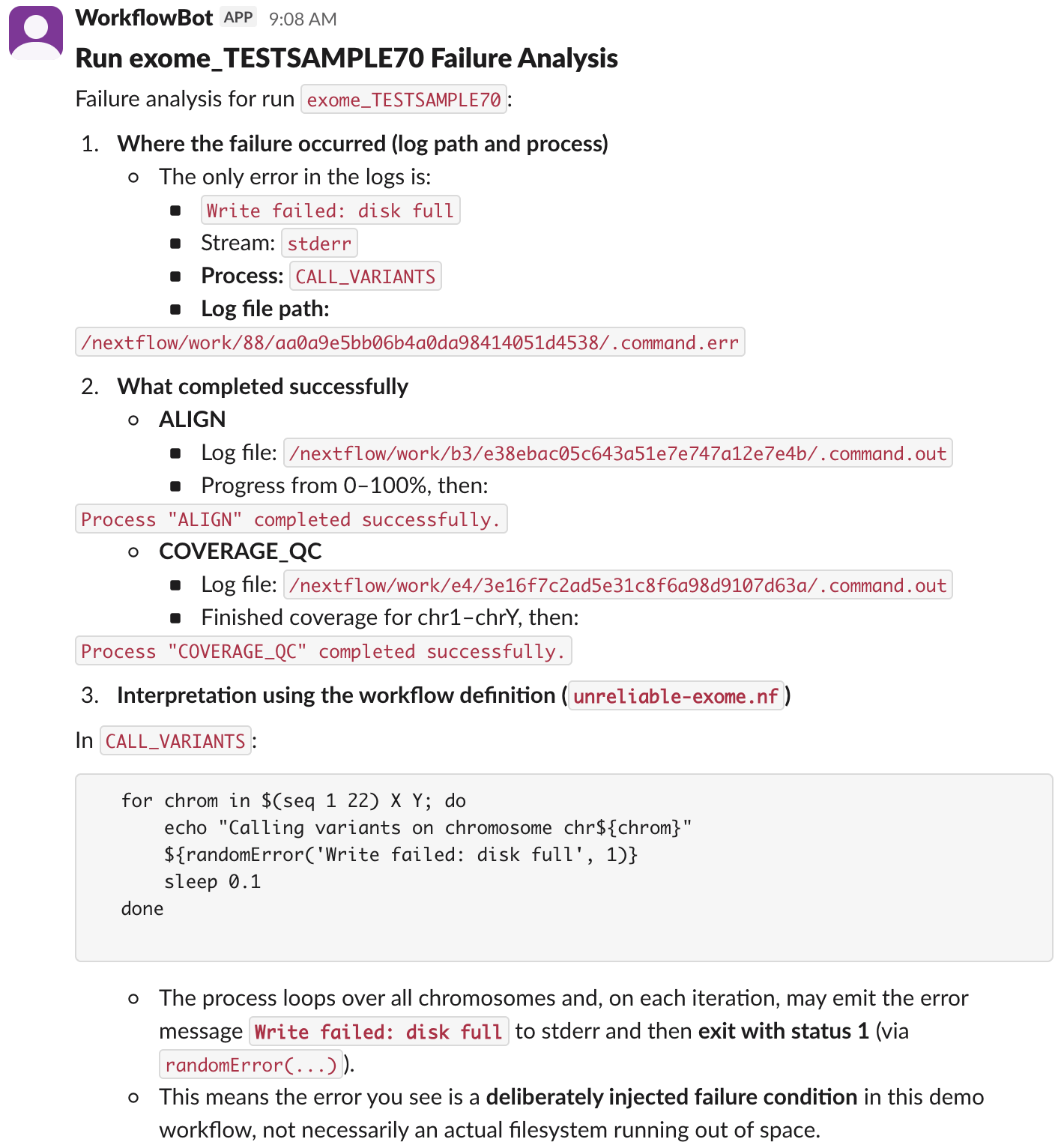
The agent worked as designed, and was only triggered when a workflow failure occurred in Nextflow. Not bad for an initial version! It turns out that improving the observability of our cluster had multiple benefits. Not only did it make it easier for us engineers to troubleshoot workflow failures, it allowed us to easily integrate an AI agent to automatically perform an initial analysis of each failure immediately after it occurred.
Recap
These past two posts on observability have covered a number of useful techniques:
- Adding metadata to our Nextflow log output
- Using Fluent Bit to apply the metadata to all log lines and sending them to Loki
- Querying Loki using both logcli and Grafana
- Building an AI agent and associated tools to analyze workflow failures
- Extending the AI agent to post its findings to a Slack channel
- Detecting Nextflow workflow errors and automatically launching the AI agent to investigate
I wasn’t quite sure how the AI agent would turn out when I started writing these two posts, but was pleasantly surprised and believe it has a lot of potential to be a useful automated troubleshooting tool that can be easily adapted to a wide array of different computing systems.
This agent-based approach will likely benefit from iterative development. As the agent encounters failures that it is not able to diagnose, you can modify the instructions and tools to help it troubleshoot similar failures in the future. For example, it might need more information about the state of the Slurm compute node when the failure occurred. Similar to how we collect Nextflow logs in Loki, there are other systems for collecting time series data related to CPU usage, memory, disk space, and network bandwidth. These can be exposed as tools to allow the agent to query the metrics for specific Slurm nodes, allowing it to provide more informed guidance when attempting to determine the cause of a workflow failure.
I hope these two posts have convinced you of the value that improved observability brings when designing systems to handle complex genomic data processing. Not only do you get immediate benefits for support engineers, but you also lay the groundwork for allowing future systems like AI agents to monitor and diagnose issues autonomously. There might even be a time in the not-too-distant future when we can’t imagine running and monitoring complex compute infrastructure without the assistance of AI.
Additional notes
If you’d like to experiment with this mini-Slurm cluster yourself, you can try it out using my fork of Giovanni Torres’s slurm-docker-cluster repo. I’ve made a few changes to the base Docker image:
- Installed Python 3.12
- Installed Nextflow
- Installed uv
- Added a third cluster node (c3) and set all 3 nodes to 4 CPUs each
- Added a
slurmuseraccount (usemake root-shellfor root access)
After checking out the repo, use make build followed by make up to start the cluster. Login as slurmuser using make shell.
In addition, the simulated Nextflow workflows are under volumes/nextflow in the repo, which is mounted as /nextflow inside the cluster. The AI agent code is available in volumes/nextflow/agent and has a few setup requirements:
-
First create a virtual environment (from within the cluster) in
/nextflow/agentlike this:1 2 3 4
cd /nextflow/agent uv venv -p python3.12 source .venv/bin/activate uv pip install -r requirements.txt
- Add an
OPENAI_API_KEYto/nextflow/agent/.env - Add a
SLACK_BOT_TOKENto the.envas well if you want to try the Slack-posting version of the agent. You’ll of course need to first create and configure a Slack app in your organization and invite the associated bot user to the channel specified inagent-slack.py.